Building a Framework-Agnostic Design System
One design system for React, Svelte and Flutter, built by four designers and one developer at Tinka
#design-system
Intro
This article is about building one design system for React, Svelte and Flutter at Tinka, with four designers and one developer (me). It's not about building the perfect solution, but about finding one with acceptable trade-offs. "I did all these and survived!" is the main message.
In May 2024, I gave a presentation about it to Ansin Lau and his team. His team faced a familiar challenge: they had to build a design system and might have to maintain several UI libraries, because their users (the product teams) wanted to try different tech stacks while keeping the user experience consistent.
After the talk, one listener said it was nice to see how someone actually went through implementing all those things. That was such lovely feedback that I decided to write it down, hoping it helps someone in the future.
The Challenge
Tinka is a medium-sized FinTech company that split off from the e-commerce company Wehkamp in 2021. We launch new websites and apps all the time, and one design team is responsible for all of the design: four designers (including me) and one developer (me) focused on UI/UX.
Our product teams use all kinds of technologies. Most use React, some use Svelte for specific needs, and our documentation websites are built with a Python site generator. The app team uses Flutter for our cross-platform mobile app. After the 2021 rebrand, none of these teams had time to implement the UI components again.
Third-party merchants also use our brand and UI elements. We can't foresee their setup, but they are important users of the design system too.
A framework-agnostic design system is the ideal: design and implement once, target many platforms. We want our designers to ship designs with confidence that developers won't come back saying the design takes far longer than expected. So we ship components not only in Figma but also as code, without getting swamped by supporting every framework out there. Our designers use one set of components and expect a consistent experience across everything Tinka offers.
The Hypotheses
Documentation-driven design system could save us
Similar to the idea of test-driven development, being documentation-driven encourages me to think about how I communicate my API and design. It automatically puts me in the mode of finding an efficient way to help a large user base.
Good documentation can create a common language between designers and developers. Something that is implemented, explained in context, and comes with usable code snippets helps both sides understand why a design is the way it is, and whether it is feasible.
Make libraries with lots of CSS, a little bit of JavaScript, and barely any HTML.
Each framework handles DOM manipulation and state differently, so we decided to leave the HTML for each developer to implement, while providing comprehensive support for appearance from one official library.
A typical design-token approach looks like this:
import tokens from "design-system";

const aThing = <Thing
  background={tokens.thing.backgroundColor.active}
  textColor={tokens.thing.foregroundColor.active}
/>
We wanted something closer to this instead:
<tag class="component component-state component-modifier">The base class makes any tag look like the component. Classes for states and variants go on top.
For components with custom behavior, we imagined this workflow for developers:
import { getComponentStyle } from "design-system";

const setOfClasses = getComponentStyle( props, states )

const result = (<tag class={setOfClasses.container}>
  <tag class={setOfClasses.someInnerThing1}></tag>
  <tag class={setOfClasses.someInnerThing2}></tag>
</tag>)
getComponentStyle is a pure JS function, so it works in any framework. In other words, it is framework-agnostic.
Developers look up the component's HTML structure in the documentation and put the function's output in the right places.
This sounds inconvenient, and in some ways it is. The next section covers the advantages, and what we did to limit the downsides.
The Implementation
The base package with TailwindCSS
The core base styling package is built with TailwindCSS. TailwindCSS is a cheat code for turning base tokens into utility classes, more than anyone will ever need. Thanks to Tailwind's excellent documentation, I don't have to document all these selectors myself.
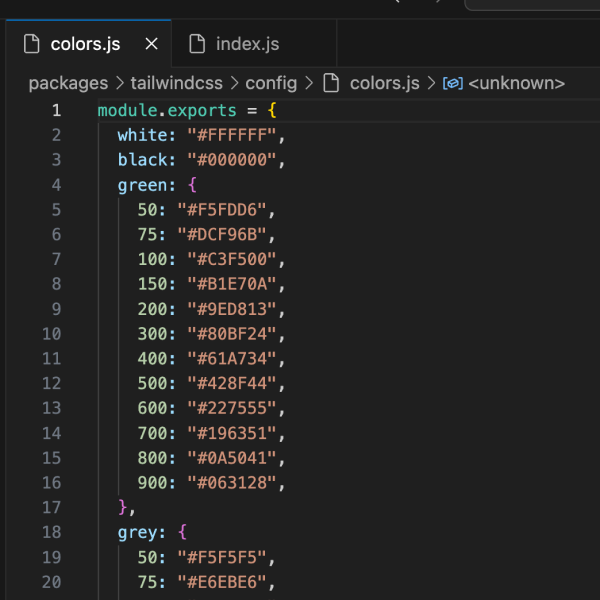
Encode base design tokens into the Tailwind config file. You can write a script that does this programmatically in the console even before Figma’s Variables. 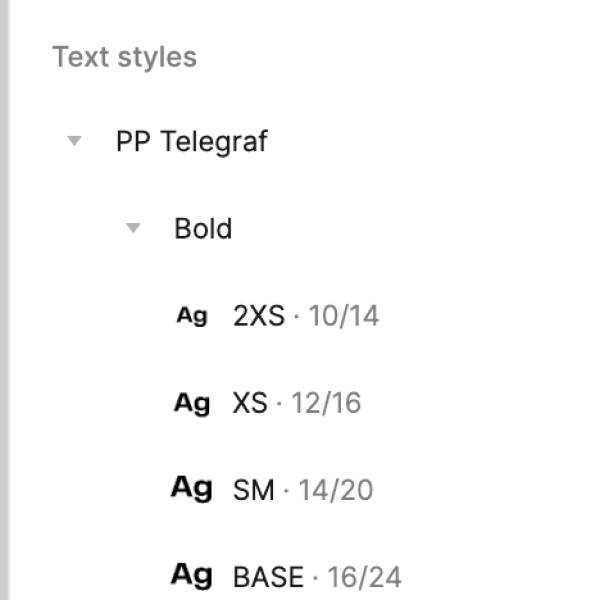
Make sure the tokens available in code are also present in Figma. It might look excessive but it is important to keep both side mirrored. 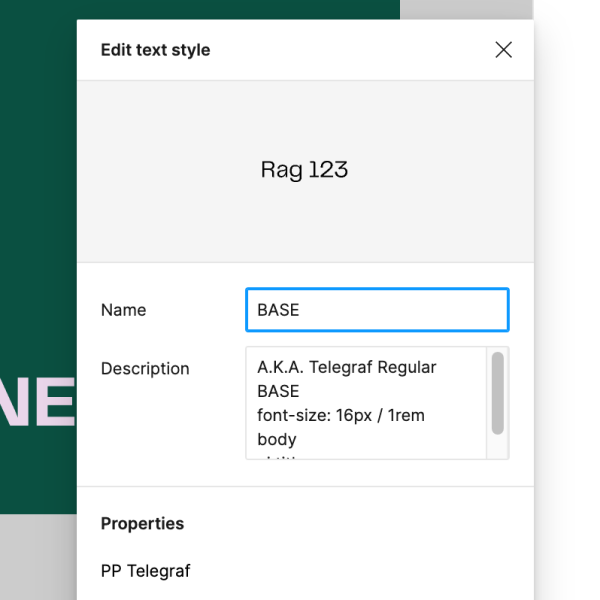
Add the keywords to the description so the designers can find them by typing keywords like "body"
You might wonder what happens when someone uses a base token in a way the design system doesn't allow. In my opinion, the best prevention is close collaboration and active communication, which leads to the next point:
Documentation as the key communication tool
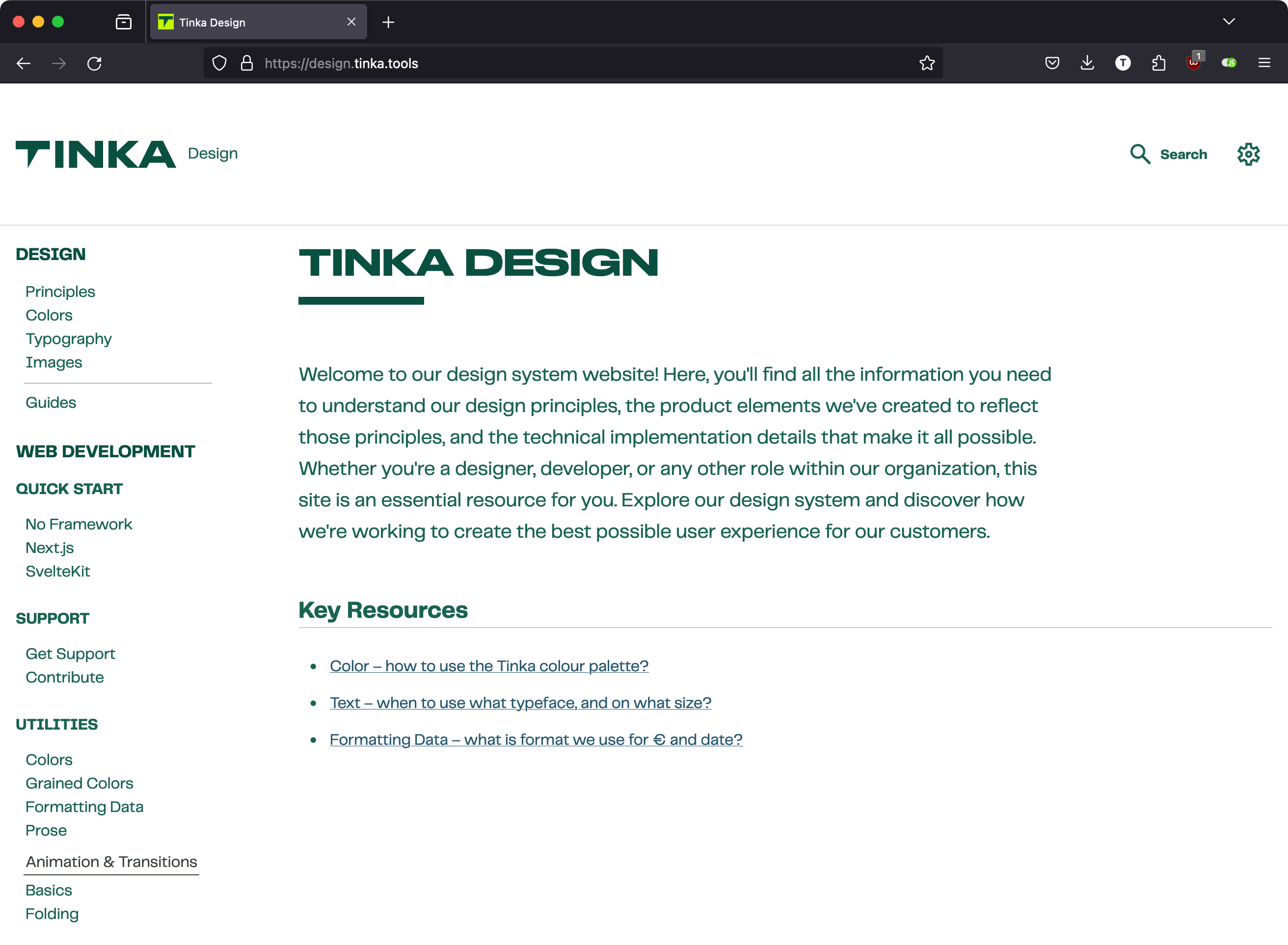
The documentation is one of the most important links in the whole project, so we made it public and developed all our components inside it. It's like Storybook, but we built it with Next.js so we wouldn't be limited by what Storybook can show.
While building the documentation site, we could also make a first-party React library and release it as a separate package that depends on the base package.
Since developers outside React don't get a ready-made DOM structure from us, the documentation must be very clear and easy to read.
Office hour
I learned this method from a past talk at Figma's Config.
Every Tuesday morning we have a 45-minute session with all our designers and developers. I present the latest additions to the design system, the designers show how they use the components and what could be improved, and the developers bring suggestions and feedback on the docs. If we need more time, my Slack is always open and I prioritize meeting requests from design system users.
This has been very constructive. Usage guidelines for our base colors and typography tokens formed naturally, without me painstakingly identifying every need and naming it. Developers brought all kinds of interesting use cases and asked for documentation on them, such as a loading state for the button: obvious now, but I missed it in the first few iterations.
Example: Simpler components – our buttons
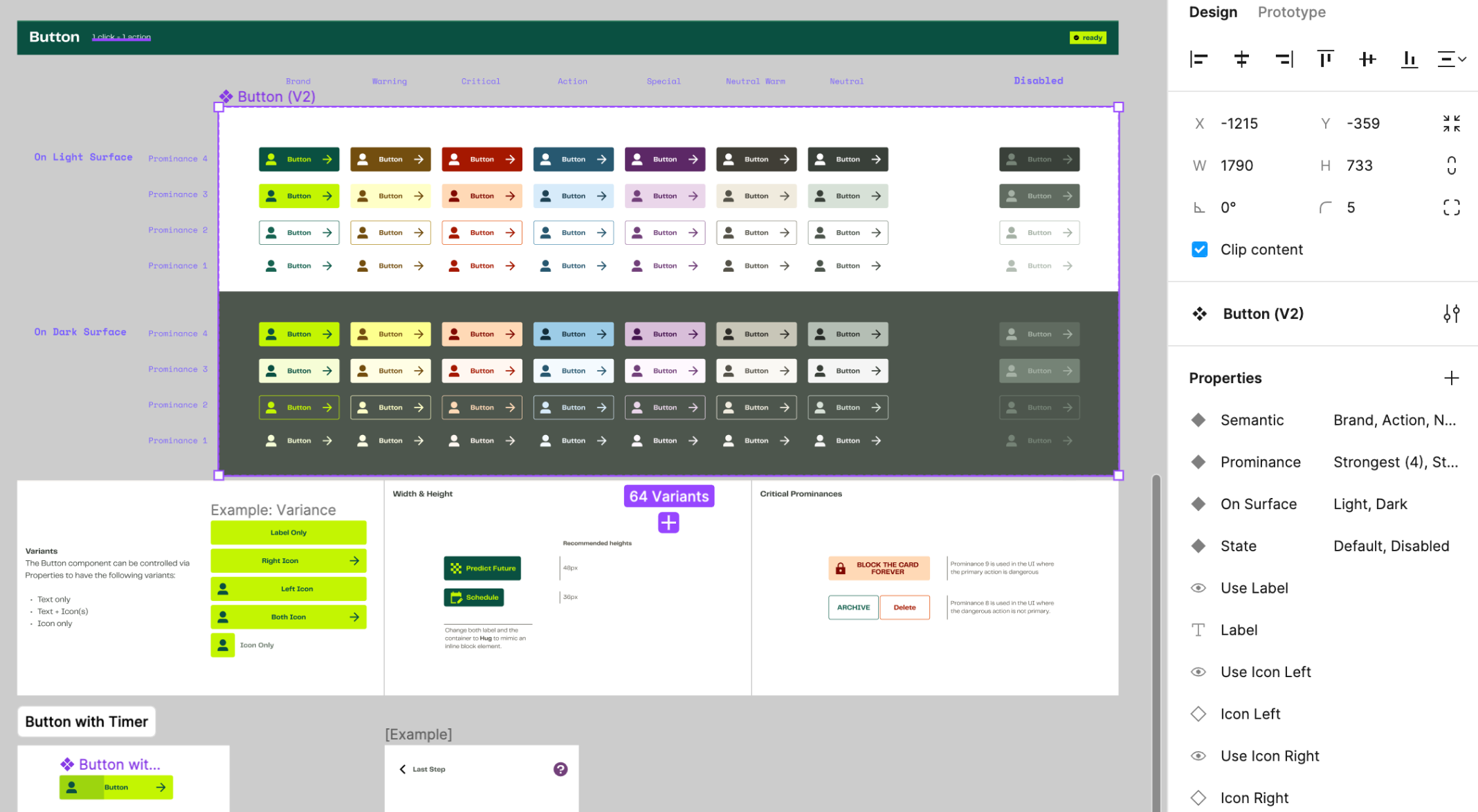
Our buttons are pretty basic and can be described entirely in CSS. But they need to be flexible: on web pages, tags like <button>, <a> or even <input> may need to look like a button. This is where a CSS-only approach shines.
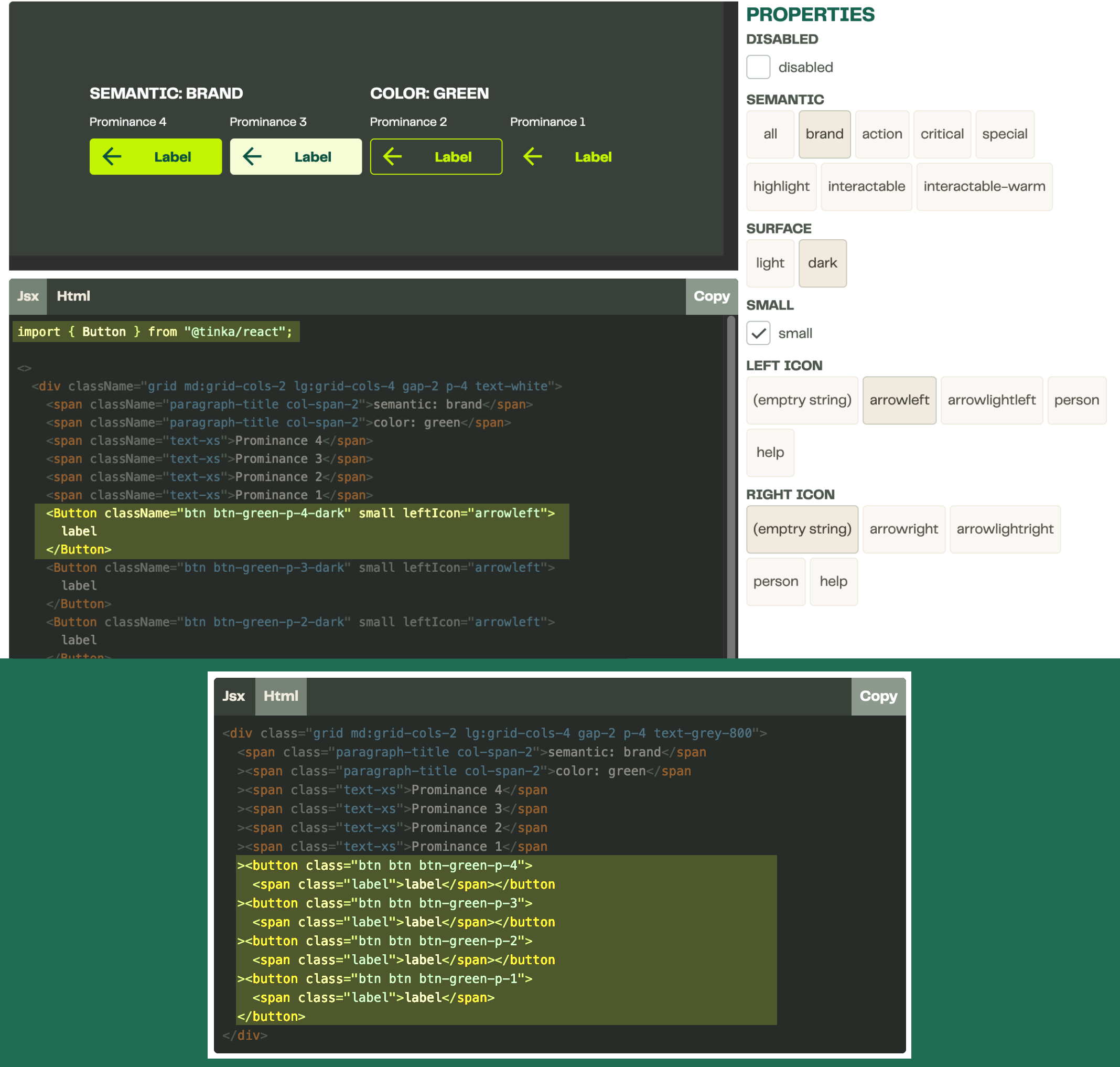
Button Playground
Developers can see how to implement a button right in our documentation, with a full playground.
The Properties panel provides the exact same props as the component has in Figma. This enables seamless communication between design and development.
The code preview outputs the right snippet for developers to copy and paste into their project. This further reduces the chance of misalignment.
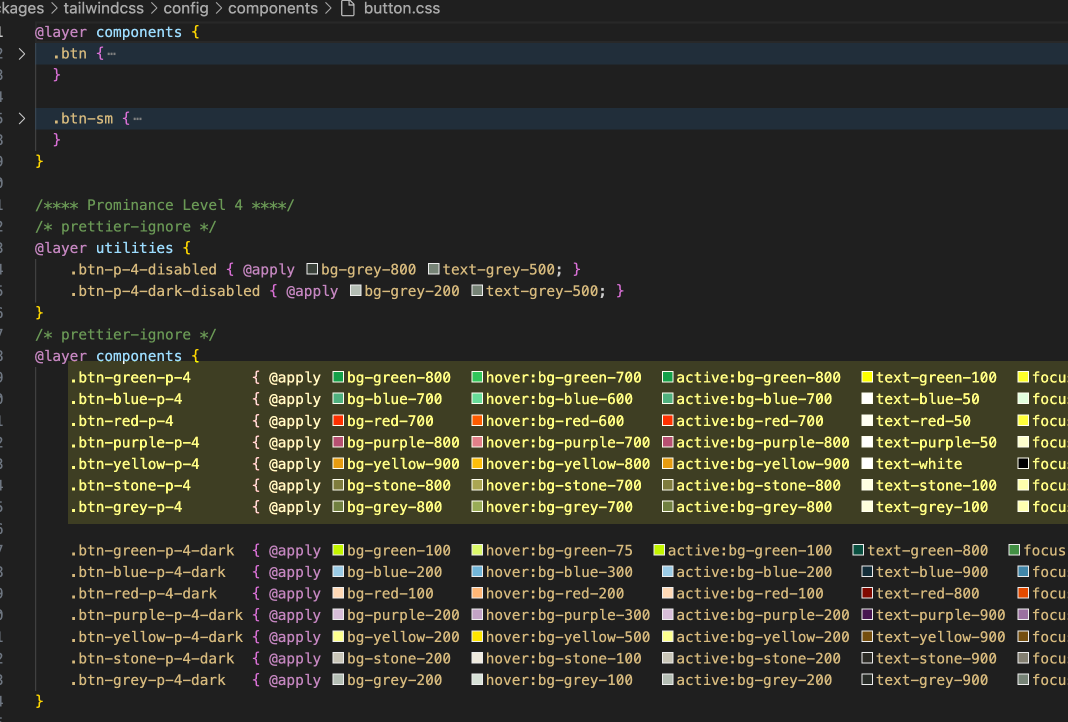
The CSS file
Instead of describing visual importance as "primary" and "secondary", we use a Prominence system. Each color is assigned a semantic meaning, and is further expanded based on interaction like here in Button - Semantic.
We still use Tailwind-specific syntax instead of vanilla CSS to benefit from Tailwind's state modifiers. I tried vanilla approaches like CSS variables or plain CSS, but @apply turned out to be the easiest to author: the color tokens are laid out like the table in our Figma file.
It's possible to generate this file automatically with token plugins or Figma's new Code Connect. We wrote it by hand because we don't expect to iterate on buttons often at this stage.
Example: Complicated components – Input Field
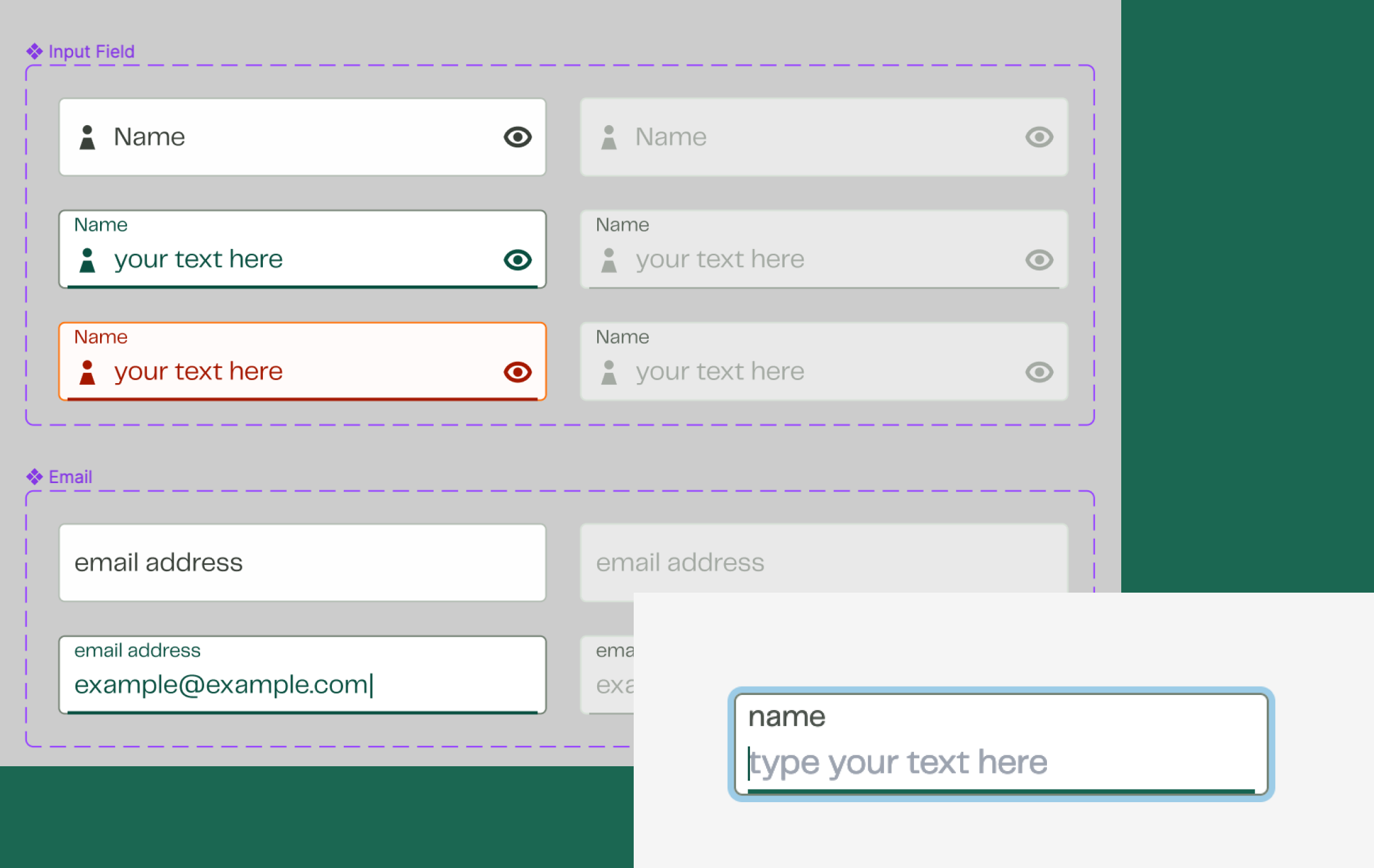
Some components can’t be described purely in CSS, because their internal layout changes with their state. Our input field is one of them.
How did we prepare this for each framework?
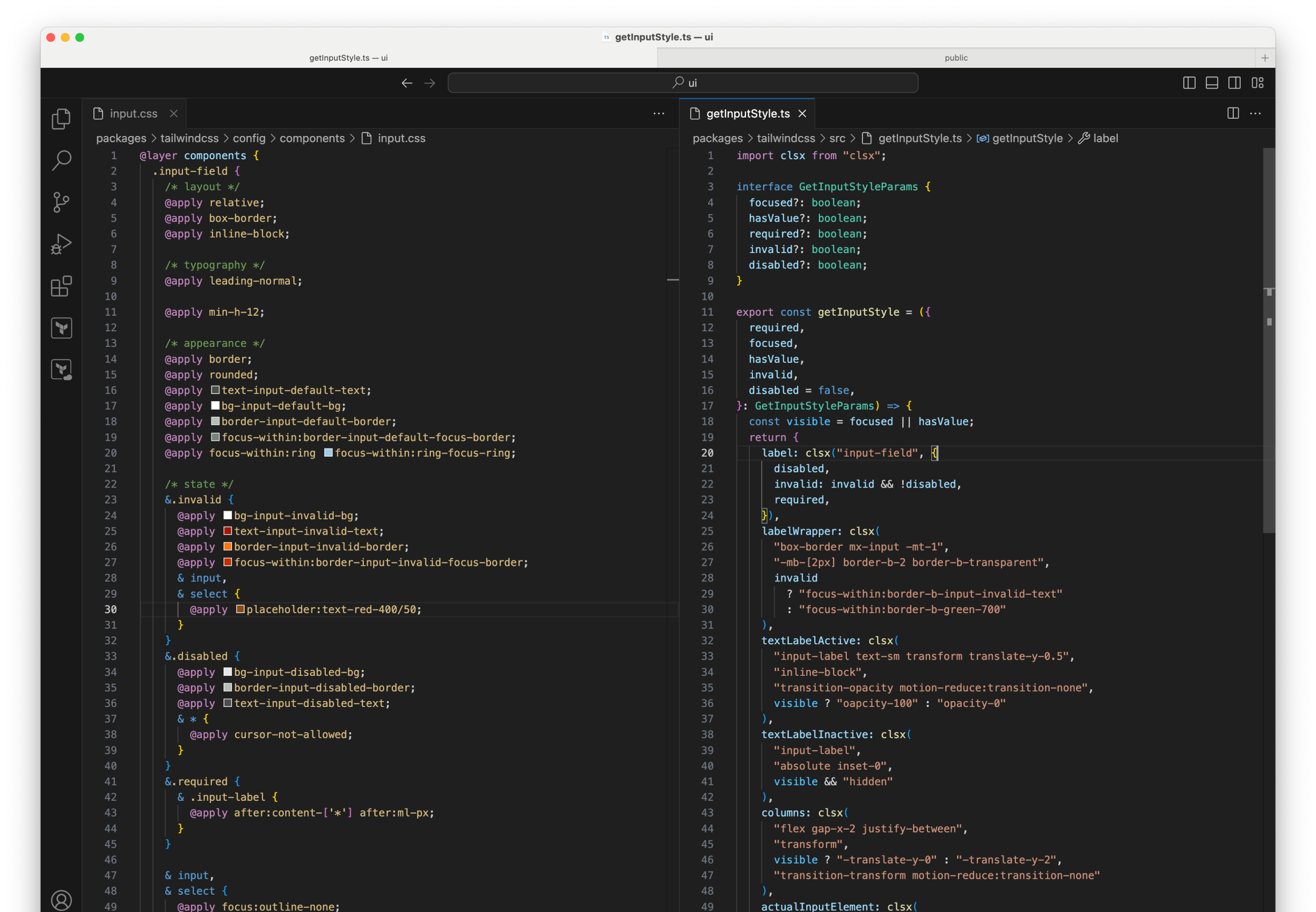
The CSS file
We still try to encapsulate as much appearance into a state selector as possible. This can help us continue to simplify the JS function in the future.
The JS that takes state and outputs strings
This is what the function looks like inside. It looks like a lot, but developers only see these long strings as classnames.labelWrapper.
We implemented this component for Svelte and React together with developers from the product teams.
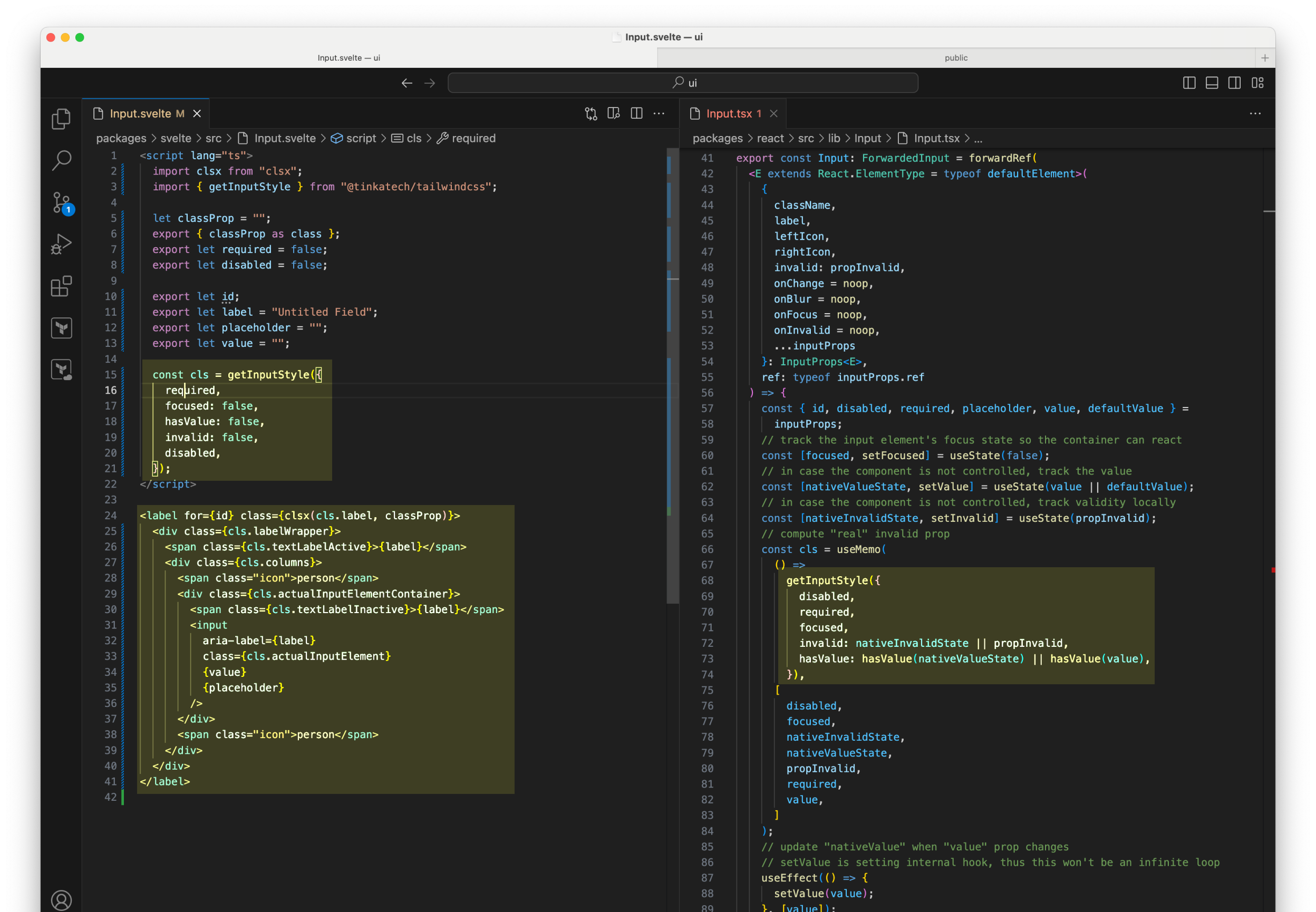
Input in Svelte
Input in React
For each framework we only write the framework-specific code and duplicate the HTML structure. Everything that controls appearance is imported from the same source.
In theory, more could be shared, such as how content is formatted. We've learned that the best way to support more users is to provide a basic framework-agnostic toolset: the CSS and the JS utility. As adoption grows, we might bring the teams' component code into the core UI libraries (with permission).
Break components down into patterns
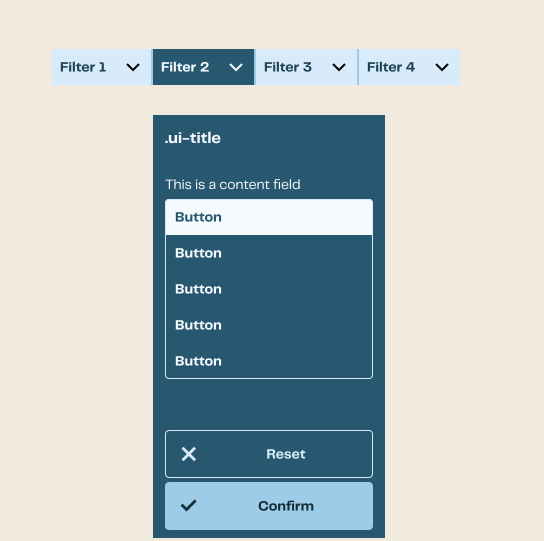
Every project controls how a floating menu opens and where it sits a little differently. As the maintainer, I couldn't foresee all the requirements and design an easy-to-use API.
For components like this, I only implemented the look in CSS and wrote a style guide that shows developers how to apply the utility classes. I also implemented an example in React with Headless UI.
Sometimes using technology to enforce a design creates more work for maintainers and users. Instead of treating these as components with internal workings, we treat them as composable patterns and leave the state to the developers. Through examples and code snippets, we help them understand what makes a UI pattern consistent and usable.Brad Frost describes a similar approach in The Art of Design System Recipes, which I read recently.
Without Frameworks
<head>
  <link rel="stylesheet" href="https://www.tinka.nl/assets/styles/plain.css" />
</head>
For users whose setup can't include TailwindCSS, we wrote a no-framework guide: design.tinka.tools/develop/quick-start/no-framework for them.
plain.css is generated by Tailwind with a selected set of utility classes. I listed them in an HTML file and added it to the content array in the config.
A small PostCSS plugin I wrote prefixes every selector with a .tinka parent, so the stylesheet is scoped and safer to use on other domains.
Maintaining the code
We have a monorepo that contains the code for the base Tailwind package, content formatting package, icons, React package and much more. We are using Nx to manage the repo.
Validating and building the packages is where we invest most in automation. Our CI/CD and publishing are set up on GitHub with GitHub Actions and GitHub Packages.
For versioning, we use Google's Release Please. It checks each package for updates, bumps the package.json files, writes the changelog and creates Git tags automatically. This is saving me tons of time as a solo dev on this project.
Our Flutter-side project
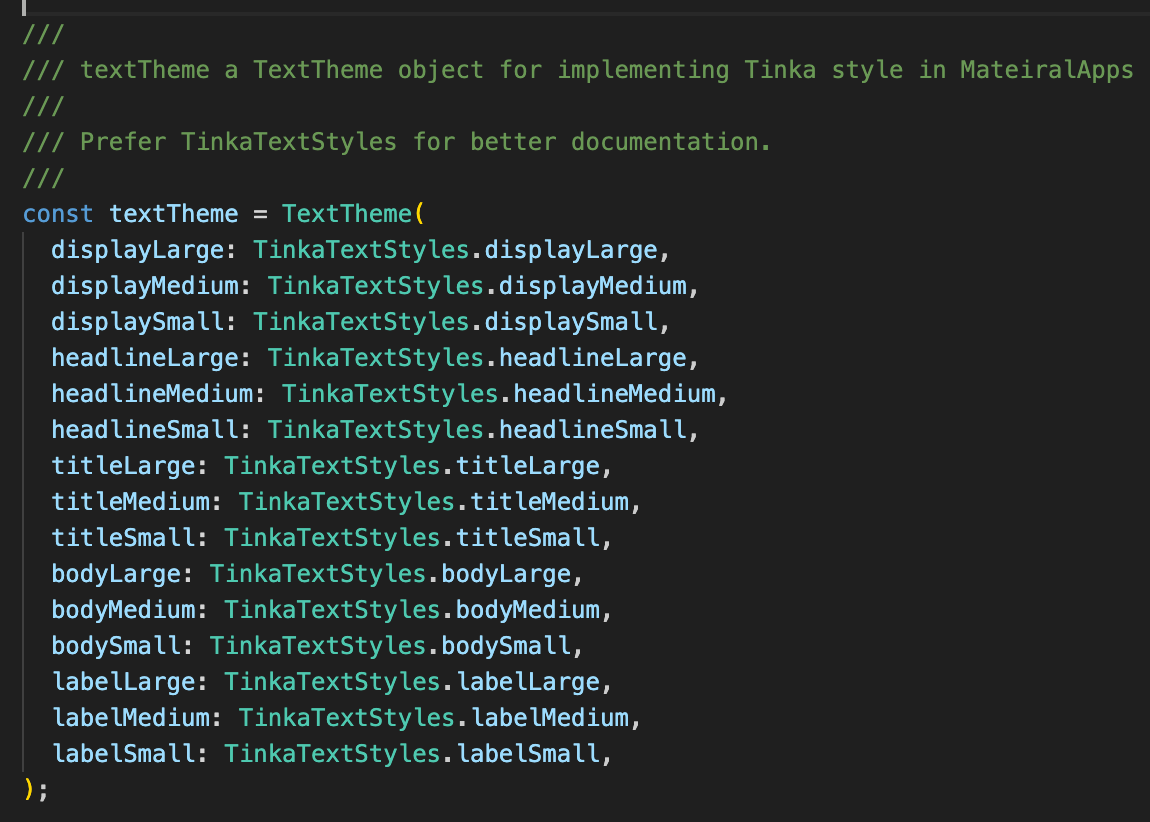
Around the beginning of the second year of the project, I started to work on a Flutter UI library written in Dart. This is an area I've always wanted to explore.
Here, only about 20% of our framework-agnostic approach carries over to the new ecosystem: the tokens, the naming and the documentation. Every component has to be rewritten, and each one needs a different structure.
However, with solid usage guidelines and documentation, implementing the components is fairly straightforward. Flutter is a very well-designed framework for implementing design, which also sped things up. As soon as we shipped the StyleSheet, the app team took it into production.
And the Material-looking input field I apologized for earlier? It paid off here.
The Result
Feedback
We have reasonable uptake in new projects that use React and Svelte. While preparing the presentation, I noticed that one ancient codebase had also started using the new design system.
Our product teams are always under time pressure, so they adopt anything that helps them work faster. We put enormous effort into documentation and developer support, which made adoption much easier.
Building on a well-documented, flexible framework like Tailwind also helped me support a much wider range of technologies. There are no Vue users in our organization yet, but I'm confident that helping them get started with solid, consistent UI wouldn't take much of my time.
The designers gave positive feedback on the Figma setup. Having every text style for every typeface, without semantic names like "Title" or "Body Text", has a learning curve at first. But they came to prefer it: designs aren't tied to just one style for a specific title, and everything can be set in relation to everything else while staying consistent.
Did we manage to be framework-agnostic?
At the very least, we support as many web frameworks as Tailwind does, and the credit for that goes to that amazing open-source project.
Our designers use the same Figma library whatever the tech stack. Designing is about how the user interacts with the elements, not about the technology underneath.
The web developers I talked to didn't feel the design system limited their choice of tech. One thing to note: our choice of Next.js for the documentation convinced many of our developers to stay with React.
For the app developers, we are still catching up on implementing the components. But having someone take care of naming, documenting and implementing all the colors and text styles is already a big help.
Did the hypotheses hold?
Documentation-driven: yes. The documentation site became our main communication tool, and the office hours turned it into a conversation. It is the main reason teams adopted the design system.
Lots of CSS, a little JavaScript, barely any HTML: mostly. Buttons and patterns like the filter menu work with CSS alone. The input field needed a small JS function, but it stayed framework-agnostic. Flutter is where the approach stops, and only the foundations carry over.
Conclusion
To summarize: we made our design system framework-agnostic with documentation and solid base-layer tooling. A bring-your-own-state-management approach keeps the library API from being stretched to fit everyone's needs, and customization is always possible. We only build full components for every framework when a component must not be customized, and that has rarely happened.
In a constantly pivoting FinTech company like Tinka, being framework-agnostic alone is not enough. But it was a good way to win the product teams over. Because of this goal, the design system became more than a tool for our designers: it sped up our developers too, both in building and in communicating. It convinced me that good documentation and active communication are what really keep design consistent and manageable.